



Always check your product’s artwork instructions. Bleed and safe margins can vary by product.
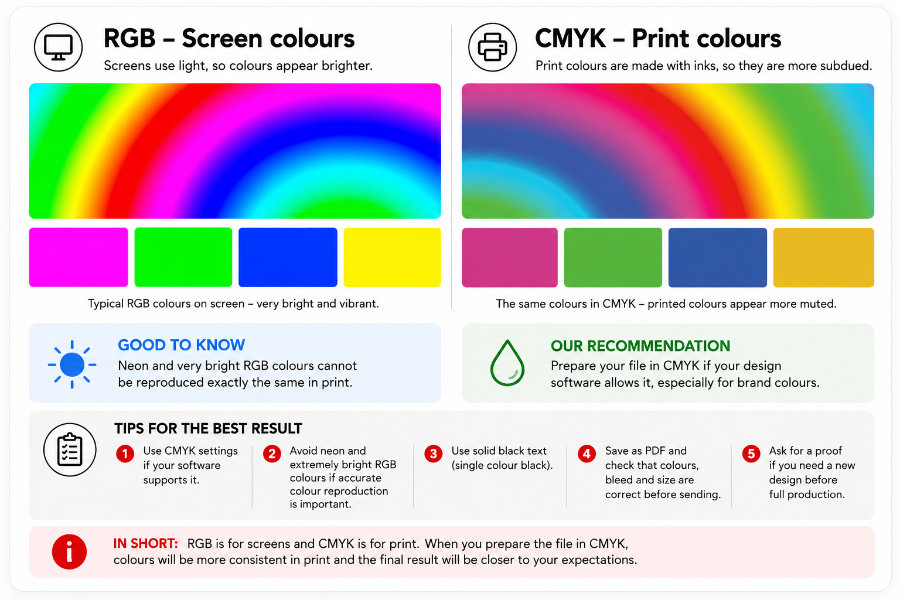
What is the difference between RGB and CMYK?
The main difference is that a screen creates colours using light, while printed colours are produced with inks or toner on paper.
RGB – colours on screen
RGB stands for Red, Green and Blue. Screens create colours using light and can therefore display very bright and intense colours.
For example, electric blue, neon green and intense pink can appear considerably brighter on screen than they do in print.
CMYK – colours in print
In print, colours are produced using cyan, magenta, yellow and black. Paper does not produce light – it reflects it.
The printable colour range is more limited than the colour range of a screen, so the brightest RGB colours may appear more subdued in print.
Can I send RGB artwork for printing?
Yes – RGB is not an error
You can send RGB artwork to aDigi normally. During production, the colours are processed into a colour space suitable for the printing equipment.
For many customers, this is safer than making a CMYK conversion themselves using incorrect settings or the wrong colour profile.
If you use Canva, for example, a high-quality RGB PDF is generally perfectly suitable as print artwork.
When should I prepare the artwork in CMYK?
Working in CMYK is useful when colour is managed professionally from the design stage onwards.
- Brand colours
When company colours need to reproduce as consistently as possible. - Very bright colours
When the artwork contains intense or neon-like colours. - Repeat print jobs
When the same colour palette is used repeatedly across printed products. - Professional artwork preparation
For example, when using colour-managed workflows in InDesign or Illustrator.
What happens to RGB colours in print?
RGB → printable colour range
RGB can display some colours that standard four-colour printing cannot reproduce in exactly the same way.
If a colour falls outside the printable colour range, it is converted to the closest printable colour. The limits of a colour space are known as its gamut.
A very bright colour may therefore become slightly darker, greyer or less saturated. With ordinary photographs, the difference is usually less noticeable.
Small black text: 100% K
Small black text should preferably be set to 100% K rather than a combination of all four CMYK colours.
This helps keep small text as sharp as possible. For large black areas, a rich black can be used when appropriate.
When colour accuracy matters
A screen is not a printed proof
A phone, laptop and calibrated graphic-design monitor can all display the same colour differently.
The whiteness, shade, gloss and texture of the paper, as well as the surrounding lighting, also affect how a printed colour appears.
Brand colours and other critical colours
If accurate reproduction of a logo, packaging colour or other brand colour is particularly important, let us know when placing your order.
If necessary, we can produce a printed proof before the full print run. A printed proof gives a more reliable indication of the final result than an ordinary screen.
Frequently asked questions about RGB and CMYK
Is an RGB file unsuitable for printing?
No. RGB artwork can generally be printed without a problem. The colours are processed into a colour space suitable for the printing equipment during production.
Do I need to convert a Canva PDF to CMYK?
Usually not. A high-quality PDF exported from Canva can be sent to aDigi as it is. An unnecessary CMYK conversion afterwards can cause more problems than it solves.
Why does a neon colour change in print?
Standard four-colour printing cannot reproduce all the extremely bright colours that an RGB screen can display. The colour is therefore adjusted to fit within the printable colour range.
Can colours look different on different papers?
Yes. The whiteness, shade, gloss and surface texture of the paper affect the perceived brightness and contrast of printed colours.
Should I order a proof for an important colour?
Yes, if accurate colour reproduction is critical to the job. A printed proof gives a more reliable indication of the final result than viewing the artwork on an ordinary screen.
Is CMYK always better than RGB?
No. Properly prepared CMYK artwork is an excellent option, but converting with the wrong colour profile can reduce colour quality. A good RGB file can be a better starting point than an incorrectly converted CMYK file.